
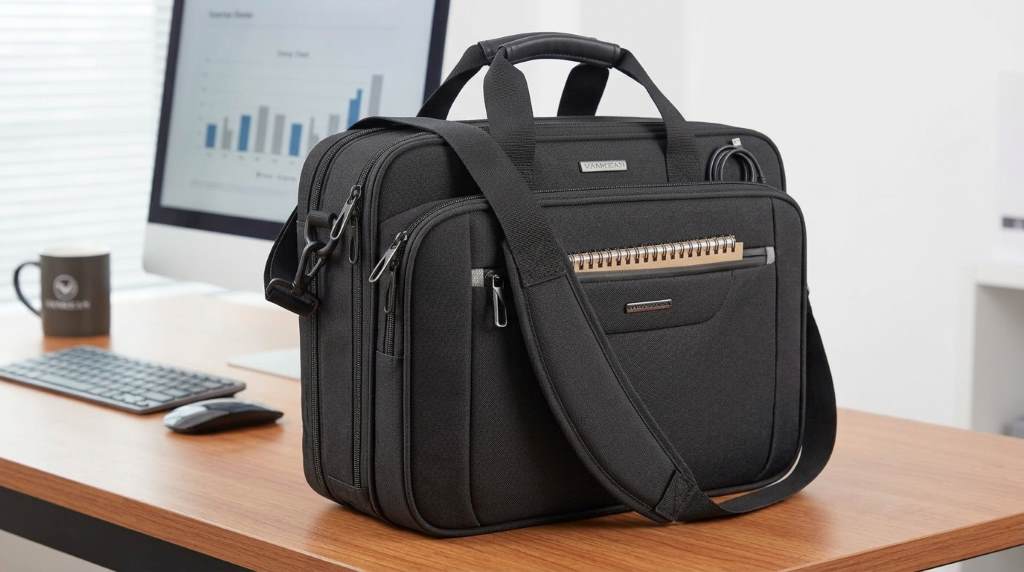
The Vankean Business Laptop Bag can hold a 17.3-inch laptop, tablet, documents, chargers, and daily work essentials. Its expandable design also creates extra room when meetings, commutes, or business trips require more gear.
For professionals comparing laptop bags, capacity matters beyond simple laptop compatibility. The bag measures about 18 by 12.8 inches and expands from 7.5 to 9.5 inches.
That expandable profile gives this Vankean Business Laptop Bag an advantage over slimmer briefcases. Instead of judging capacity by appearance, consider how its compartments divide everyday equipment.
What Fits Inside the Vankean Business Laptop Bag?
The Vankean briefcase supports a surprisingly broad workday load. Its layout separates computers, documents, accessories, personal items, and smaller valuables.
Most importantly, the main laptop area accommodates computers measuring up to 17.3 inches. The padded construction helps separate the computer from surrounding belongings.
- Up to one 17.3-inch laptop
- An iPad or similarly sized tablet
- A laptop charger and power adapter
- External drives, mouse, and cables
- A4 documents, folders, notebooks, and files
- Wallet, phone, cards, pens, and small accessories
- Power bank and other compact electronics
However, capacity depends on how efficiently you use each compartment. A well-organized load can feel considerably larger than a randomly packed load.

The Laptop Compartment Handles the Largest Item
The laptop compartment remains the bag’s primary storage zone. It provides dedicated space instead of forcing your computer into the general cargo area.
Models in this Vankean range accommodate laptops up to 17.3 inches. The available compartment dimensions can vary slightly between specific models, so measure your device before buying.
That distinction matters because screen size does not equal physical laptop dimensions. A thick gaming laptop can require more clearance than a slim business notebook.
What Should Stay With the Laptop?
Keep the charger close to your computer but avoid stacking heavy objects against the laptop panel. Place the adapter inside an organizer section when possible.
- Laptop
- Charging brick
- Charging cable
- Wireless mouse
- External SSD or hard drive
- USB accessories
This arrangement reduces cable clutter while keeping frequently needed electronics accessible. It also prevents loose accessories from pressing directly against the laptop.
Can It Carry a Tablet and Documents Too?
Yes, the bag can accommodate a tablet alongside a large laptop and work documents. Its multiple sections make that combination more practical than a single large compartment.
For example, place the laptop in its protected sleeve and position the tablet within another organized section. Then reserve the remaining space for files, notebooks, and chargers.
A4 documents fit naturally into the briefcase’s document-friendly storage areas. Consequently, professionals can carry meeting materials without folding important pages.
A Practical Workday Load
A realistic office load could include a 17.3-inch laptop, tablet, charger, notebook, documents, mouse, and wallet. The expandable section becomes useful when that normal load grows.
| Item | Recommended Storage Area | Why It Works |
|---|---|---|
| 17.3-inch laptop | Padded laptop section | Dedicated protection and separation |
| Tablet | Organized interior section | Keeps secondary electronics separate |
| A4 documents | Main or document section | Preserves papers without folding |
| Charger | Accessory pocket | Reduces cable clutter |
| Wallet and cards | Front organizer | Provides faster access |
| Mouse and cables | Small interior pockets | Keeps accessories grouped |
How Much Extra Gear Can the Expandable Design Handle?
The expandable construction represents one of the bag’s most useful capacity features. Its depth can increase from approximately 7.5 to 9.5 inches.
That extra depth gives you room for bulkier documents, additional accessories, or a larger daily load. Therefore, the bag works differently from a rigid briefcase with fixed capacity.
Still, expansion should not become an excuse for overloading the bag. Excess weight can reduce carrying comfort and place unnecessary strain on the shoulder strap.
When Should You Expand It?
Use the expansion feature when your normal laptop setup gains extra items. Business travel, conferences, training sessions, and client meetings often create these situations.
- Carry additional presentation folders.
- Add a second tablet or compact device.
- Pack thicker notebooks or binders.
- Store additional charging equipment.
- Create room for personal travel essentials.
Conversely, keep the bag compressed during lighter commutes. A slimmer profile usually makes crowded transportation easier.
Can It Hold Office Supplies and Personal Essentials?
Yes, smaller everyday items belong in the bag’s organizer pockets. These areas can separate pens, cards, phones, wallets, and other compact belongings.
That organization solves a common problem with large laptop bags. Without smaller pockets, chargers and stationery quickly disappear beneath heavier equipment.
Instead, assign each category its own location before leaving home. Consistent placement makes the bag faster to use throughout the day.
Small Items Worth Packing
- Business cards
- Pens and pencils
- Phone and charging cable
- Wallet and keys
- Passport for business travel
- Portable power bank
- Earbuds or headphones
- External storage devices
RFID-protected pockets add another layer of organization for compatible cards and identification documents. They are particularly useful when you frequently commute or travel.
Does It Work for Business Travel?
The Vankean bag can support short business trips when you pack selectively. Its luggage strap allows the briefcase to attach to compatible rolling luggage handles.
For an overnight work trip, prioritize technology and documents first. Then use remaining space for compact personal items rather than bulky clothing.
- Laptop and charger
- Tablet and accessories
- Travel documents
- Business files
- Notebook and pens
- Phone accessories
- Compact personal essentials
However, it should not replace a dedicated suitcase for extended travel. Its strength lies in carrying professional equipment and compact overnight necessities.
What Competitor Content Often Misses
Many laptop-bag articles focus on dimensions, materials, and laptop compatibility. They often fail to explain what a realistic daily load actually looks like.
A stronger buying decision starts with item combinations rather than isolated specifications. The Vankean design deserves evaluation through those combinations.
| Capacity Question | Practical Answer |
|---|---|
| Large laptop? | Yes, up to 17.3 inches. |
| Tablet alongside laptop? | Yes, organized interior space supports both. |
| A4 documents? | Yes, document storage suits business files. |
| Chargers and cables? | Yes, organizer pockets help separate accessories. |
| Extra bulky gear? | Yes, expansion provides additional depth. |
| Travel attachment? | Yes, a luggage strap supports trolley use. |
This approach also reveals an important limitation. Capacity does not mean unlimited weight, especially when the bag contains a large laptop.
How to Pack It Without Creating Bulk
Start by placing the laptop in its dedicated padded compartment. Next, position the tablet and documents against stable interior surfaces.
Then place chargers, cables, and accessories inside smaller organizer pockets. Finally, use expansion only after your essential items have their assigned locations.
- Load the laptop first.
- Add the tablet or secondary device.
- Insert flat documents and notebooks.
- Store chargers inside organized pockets.
- Place small essentials in front-access areas.
- Expand the bag only when necessary.
This method keeps heavier objects close to your back or centerline. It also prevents loose accessories from occupying valuable open space.
What Should You Avoid Overpacking?
A spacious bag can encourage users to carry items they rarely need. That habit increases weight without improving daily usefulness.
Avoid filling every compartment simply because empty space remains. Instead, remove duplicate chargers, unnecessary papers, oversized accessories, and unused gadgets.
Also consider how you carry the bag during long commutes. A heavily loaded briefcase can become uncomfortable even when everything technically fits.
Who Gets the Most Value From Its Capacity?
This bag suits professionals who carry technology, paperwork, and accessories together. It also benefits students, consultants, sales professionals, and frequent business travelers.
Its expandable structure makes it especially useful for variable workloads. You can keep the profile compact on ordinary days and increase storage when necessary.
However, minimalist commuters may prefer a smaller laptop sleeve or slim briefcase. The Vankean makes more sense when organization and flexibility outweigh compactness.
Vankean Business Laptop Bag Capacity: Final Verdict
The Vankean Business Laptop Bag can hold a 17.3-inch laptop, tablet, documents, chargers, accessories, and personal essentials. Its expandable depth adds flexibility for heavier workdays and short business trips.
The biggest advantage is not simply its size. Instead, its compartment layout lets you separate valuable electronics from paperwork and smaller accessories.
If your daily carry includes several devices and documents, this bag deserves serious consideration. Choose it when adaptable capacity matters more than maintaining an ultra-slim profile.
Before purchasing, measure your laptop and review the specific model’s dimensions. Then compare your usual load against the compartment layout for a more confident decision.
Frequently Asked Questions
Can the Vankean Business Laptop Bag hold a 17.3-inch laptop?
Yes, the bag supports laptops measuring up to 17.3 inches, depending on the specific model.
Can it hold a laptop and tablet together?
Yes, its organized interior provides separate space for a laptop, tablet, and related accessories.
Does the Vankean bag hold A4 documents?
Yes, the main storage area can accommodate A4 files, documents, notebooks, and similar work materials.
Does the Vankean laptop bag expand?
Yes, its expandable design increases depth from approximately 7.5 to 9.5 inches.
Can the bag attach to rolling luggage?
Yes, its luggage strap allows convenient attachment to compatible trolley or suitcase handles.