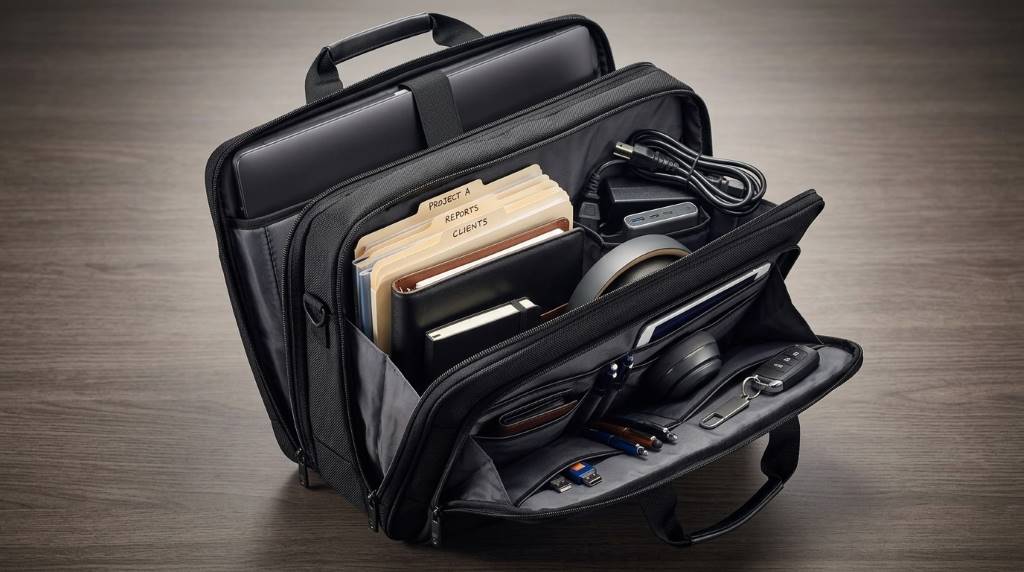
A Samsonite Triple Gusset Briefcase can carry a laptop, documents, accessories, and daily business essentials comfortably. Its three-gusset construction separates contents, reduces clutter, and creates easier access during busy workdays.
Most professional briefcases measure around 15 inches across, while modern laptops commonly range between 13 and 16 inches. That makes compartment planning especially important before packing heavier electronics or bulky paperwork.
The real advantage comes from organization rather than simply adding more capacity. Each section gives specific items a logical home, helping professionals protect equipment while maintaining a polished appearance.
What Fits Inside a Samsonite Triple Gusset Briefcase?
The briefcase can typically accommodate a laptop, tablet, files, notebooks, chargers, pens, business cards, and personal essentials. However, your exact capacity depends on the laptop size, document volume, and accessory thickness.
The three-gusset design works best when you assign each compartment a specific purpose. That approach prevents smaller accessories from disappearing beneath documents or electronic equipment.
- Main compartment: Laptop, tablet, folders, notebooks, and larger documents.
- Second compartment: Reports, contracts, magazines, writing pads, or meeting materials.
- Third compartment: Chargers, cables, stationery, business cards, and personal accessories.
- Front pockets: Frequently used items such as a phone, keys, wallet, or travel documents.
How the Three Gussets Change Packing
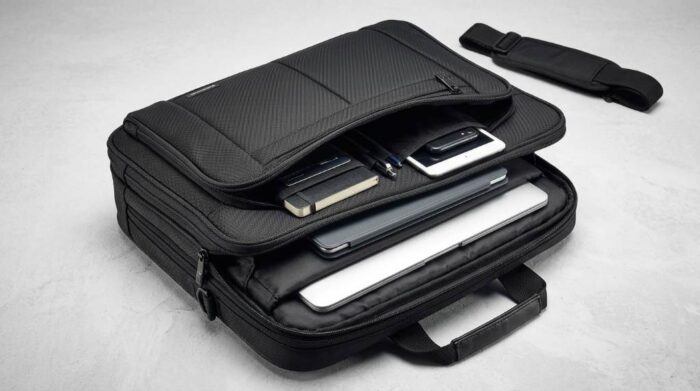
A conventional single-compartment briefcase forces different items into one crowded space. By contrast, three gussets create distinct storage zones that support faster organization.
Therefore, you can separate technology from paperwork and keep frequently accessed accessories within reach. This arrangement also reduces unnecessary opening, closing, and rearranging throughout the day.
Gusset One: Technology
Use the first section for your primary electronics and equipment that require the most protection. A laptop sleeve or padded section should hold the computer securely without excessive pressure.
You can also place a tablet, slim keyboard, mouse, or compact power bank nearby. Keep heavier chargers toward the bottom to prevent them from pressing against delicate screens.
Gusset Two: Documents and Work Materials
The second compartment works naturally for paperwork that you need during meetings or presentations. Store folders vertically when possible, because this method makes individual documents easier to retrieve.
Separate current projects from reference materials to prevent important papers from becoming buried. A thin notebook, planner, or writing pad can sit alongside folders without consuming excessive space.
Gusset Three: Daily Accessories
The third section provides useful space for smaller items that otherwise create clutter. Chargers, cables, pens, business cards, headphones, and compact personal items fit naturally here.
Use small pouches for cables and adapters whenever possible. This simple habit keeps loose accessories organized and prevents them from tangling with paperwork.
Can It Hold a Laptop and Documents Together?
Yes, a triple-gusset briefcase can carry both a laptop and professional documents when you pack strategically. The key limitation involves device dimensions rather than the number of compartments.
Measure your laptop before packing it, including its protective sleeve. Then compare those measurements with the briefcase’s stated laptop compartment dimensions.
A 13-inch or 14-inch laptop usually leaves more room for folders and accessories. Larger 15-inch or 16-inch devices can reduce available space for thicker materials.
Everyday Packing Example
A practical workday load should prioritize items you actually use rather than filling every available compartment. Overpacking can make the briefcase heavier and reduce its organizational advantage.
| Item | Suggested Location | Packing Tip |
|---|---|---|
| Laptop | Dedicated padded section | Use a slim protective sleeve |
| Tablet | Technology section | Keep it behind the laptop |
| Folders | Document section | Carry only active projects |
| Notebook | Document section | Choose a slim format |
| Charger | Accessory section | Bundle cables separately |
| Mouse | Accessory section | Use a compact wireless model |
| Pens | Organizer pocket | Carry two or three |
| Wallet and keys | Front pocket | Keep them quickly accessible |
What Should You Avoid Overpacking?
Triple gussets provide more organization, but they do not make unlimited weight comfortable. Excessive contents can strain handles, shoulder straps, zippers, and seams over time.
Avoid carrying multiple thick notebooks, unnecessary files, oversized accessories, and duplicate chargers. Instead, review your contents before leaving for work each morning.
- Remove completed paperwork before adding new documents.
- Replace bulky accessories with compact alternatives.
- Carry one charger whenever compatible devices share charging standards.
- Store emergency items separately from everyday work equipment.
- Check the manufacturer’s weight guidance before carrying heavy loads.
How to Organize a Triple Gusset Briefcase Efficiently
Start by dividing everything into three categories: technology, documents, and personal accessories. Then assign each category to one primary gusset.
Next, place your heaviest equipment closest to your back while carrying the briefcase. This positioning can improve balance and make the bag feel less awkward.
Keep frequently used items in exterior pockets whenever those pockets provide suitable protection. Consequently, you can access your phone, keys, or identification without disturbing organized compartments.
Use the One-Zone Rule
Give every recurring item a permanent location inside the briefcase. This creates muscle memory and makes missing items easier to identify.
For example, always keep charging accessories in the third gusset. Likewise, keep active documents in the second gusset until each project finishes.
Pack for Your Destination
Your ideal configuration should change according to your workday rather than remain permanently overloaded. A client meeting requires different contents than a normal office commute.
For presentations, prioritize documents, presentation accessories, and necessary electronics. For routine office days, reduce paperwork and carry only essential equipment.
Does the Briefcase Work for Business Travel?
Yes, the compartment layout can work well for short business trips when you carry limited travel accessories. It can keep work equipment separate from small essentials during airport transfers and meetings.
However, it should complement your luggage rather than replace a dedicated travel bag. Keep clothing and larger personal belongings inside suitable luggage for better weight distribution.
Best Items to Carry for Client Meetings
A client meeting usually benefits from a controlled, professional load rather than maximum capacity. Bring only the materials that directly support your presentation or discussion.
- Laptop with charging cable
- One notebook and two reliable pens
- Current presentation documents
- Business cards
- Phone and compact power bank
- Necessary adapters or presentation accessories
- Small personal essentials
This setup leaves unused space, which provides an important practical benefit. You can collect handouts or documents without immediately turning the briefcase into a crowded container.
Triple Gusset Briefcase vs. Single Gusset Design
A single-gusset briefcase often suits minimalists who carry only a laptop and several documents. A triple-gusset model makes more sense for professionals managing several categories simultaneously.
The difference becomes especially noticeable when you carry technology, paperwork, and accessories every day. Instead of stacking everything together, you can establish separate storage zones.
| Feature | Single Gusset | Triple Gusset |
|---|---|---|
| Organization | Basic | Highly segmented |
| Multiple document types | Less convenient | Easier to separate |
| Accessory storage | Limited | More flexible |
| Access speed | Moderate | Generally faster |
| Minimalist packing | Excellent | More capacity than necessary |
How Much Can You Comfortably Carry?
Capacity and comfortable carrying weight represent two different measurements. A briefcase may physically hold many items without making those items practical for daily transportation.
Prioritize essential equipment and distribute heavier objects evenly between compartments. Then test the packed briefcase before committing to a full workday.
If the handles feel strained or the bag pulls noticeably downward, remove nonessential contents. Comfort should ultimately determine your maximum everyday load.
Common Packing Mistakes to Avoid
The most common mistake involves treating every compartment as mandatory storage space. Empty capacity can improve usability because it gives you room for unexpected materials.
Another mistake involves placing heavy chargers, power banks, or accessories against fragile devices. Instead, create separation between electronics and hard-edged objects whenever possible.
Finally, avoid carrying documents loose inside multiple compartments. Use folders or document sleeves to preserve organization and protect papers from bending.
Who Benefits Most From This Briefcase?
This configuration suits professionals who regularly move between offices, meetings, client locations, and presentations. It particularly benefits people who carry both technology and physical documents.
Consultants, attorneys, executives, sales professionals, managers, and business travelers can benefit from segmented storage. Students with substantial technology and paperwork may also appreciate the organization.
Minimalists who carry only one device and a notebook may prefer a slimmer design. Therefore, choose the compartment structure according to your actual daily load.
A Practical Packing Formula
Think of the briefcase as three working zones rather than one large container. This mindset creates a repeatable system that saves time every morning.
- Zone 1: Protect and stabilize your primary technology.
- Zone 2: Separate active documents from reference materials.
- Zone 3: Control small accessories and personal necessities.
Then reserve exterior pockets for items that require frequent access. This formula keeps the interior organized while reducing unnecessary searching.
Final Verdict: What Fits Inside?
A Samsonite Triple Gusset Briefcase can handle a laptop, tablet, documents, notebook, chargers, stationery, and everyday accessories. Its strongest feature remains compartmental organization rather than simply carrying more possessions.
For the best experience, assign each gusset a clear purpose and remove items you rarely use. Before purchasing, verify the laptop compartment dimensions and expected carrying load against your equipment.
If your workday combines technology, paperwork, and accessories, this layout offers a practical organization system. Choose your contents deliberately, pack by category, and let unused space work in your favor.
Frequently Asked Questions
Can a Samsonite Triple Gusset Briefcase fit a 15-inch laptop?
It can, provided the laptop compartment dimensions accommodate your specific 15-inch device and protective sleeve.
Can I carry files and a laptop together?
Yes, separate gussets can keep your laptop protected while another section holds folders and documents.
Is a triple-gusset briefcase good for daily commuting?
Yes, its divided storage works particularly well for commuters carrying technology, paperwork, and personal accessories.
Can I use all three compartments for documents?
Yes, although dedicating one section to accessories usually improves accessibility and reduces internal clutter.
How should I pack heavy accessories?
Place heavy accessories securely near the center and distribute their weight instead of concentrating everything in one section.