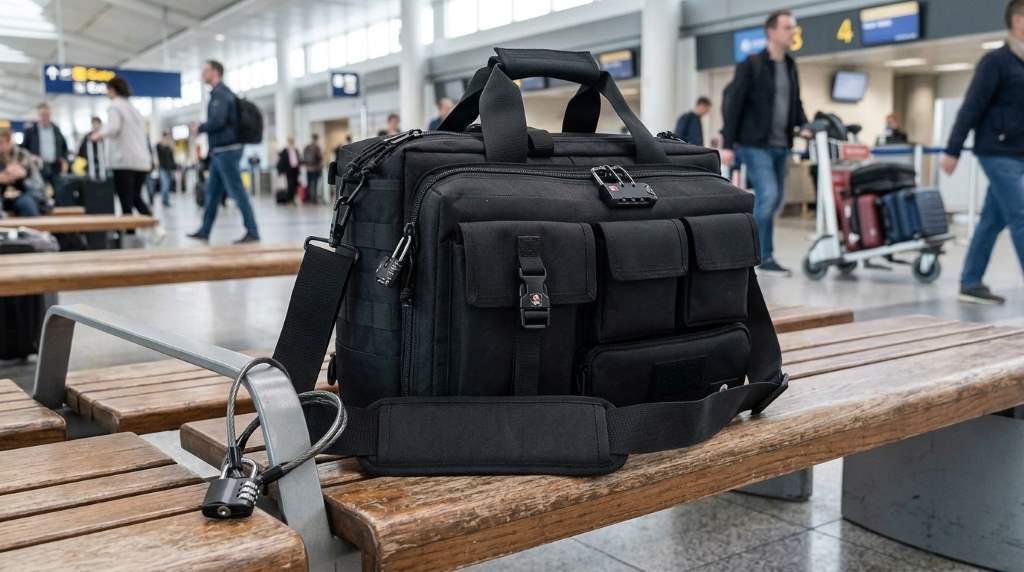
To secure a Ges tactical laptop briefcase, reinforce its zippers, protect its contents, and control where you leave it. Use a small cable lock, concealed compartments, device tracking, and strong laptop authentication for layered protection. A 2025 breach report recorded 14 incidents involving lost or stolen equipment, representing 0.60% of reported attacks. Earlier research also found that lost laptops can create significant costs because sensitive data often matters more than hardware.
Security therefore requires more than simply closing the bag before leaving home. Your Ges tactical laptop briefcase should protect both the physical computer and the information stored inside it. The best approach combines bag security, travel habits, laptop controls, and recovery measures. This guide explains each layer without relying on complicated equipment.
Why A Tactical Laptop Briefcase Needs Extra Security
A tactical briefcase usually carries more than a computer. It may hold identification documents, external drives, chargers, client materials, access cards, and other valuable items.
Therefore, physical theft can quickly become an information security problem. A thief who takes the entire bag may gain access to several assets simultaneously.
Many tactical laptop briefcases emphasize rugged construction, padded laptop compartments, organizers, and modular attachment points. However, durability alone does not prevent unauthorized access.
Security improves when you combine the bag’s existing features with sensible external controls. Think of the briefcase as the first security layer, not the complete solution.
Start With The Briefcase’s Existing Security Features
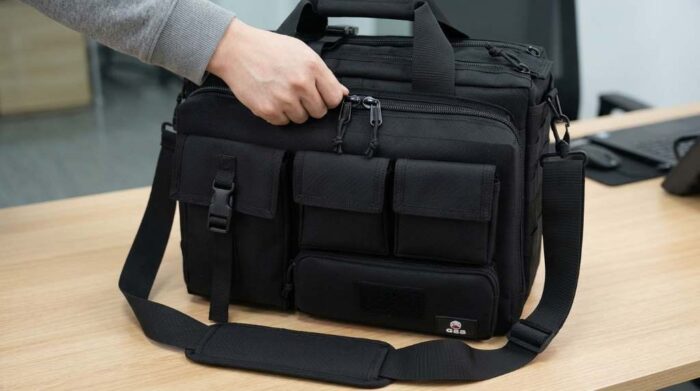
Before buying accessories, inspect every closure, compartment, attachment point, and carrying component. Identify which areas protect your laptop and which areas merely provide convenient storage.
Check The Main Compartment
Confirm that the primary compartment closes completely and keeps the laptop from shifting during movement. A padded sleeve should hold the computer firmly without compressing its screen.
Then inspect the zipper pulls and surrounding stitching for weak points. Replace damaged hardware before trusting the briefcase during travel or fieldwork.
Use The Laptop Retention System
If your briefcase includes a securing strap, use it every time you carry the laptop. Tactical laptop designs commonly use padded sleeves and retention systems to stabilize computers.
However, never assume padding equals theft protection. Padding reduces movement and impact risk, while separate security measures discourage unauthorized removal.
Add A Lock Without Making The Bag Impractical
A portable cable lock can provide another barrier when you need to secure the briefcase temporarily. Choose a compact lock that works with the briefcase’s zipper pulls or a reinforced attachment point.
For stronger protection, secure the bag to a fixed object when circumstances allow. Use this method during short breaks, especially when working in shared spaces.
Never depend on a lock as your only defense. A determined thief can still steal an unattended bag, damage its material, or target the laptop itself.
Choose The Right Locking Method
- Select a compact combination or keyed cable lock.
- Check whether the zipper pulls accept the locking mechanism.
- Prefer reinforced attachment points over thin fabric loops.
- Avoid bulky locks that damage zippers during daily use.
- Test the lock repeatedly before traveling with it.
Secure The Laptop Inside The Briefcase
Bag security protects the container, but laptop security protects your actual data. Enable full-disk encryption whenever your operating system supports it.
Next, use a strong password or passphrase with biometric authentication when available. Also enable automatic screen locking after a short period of inactivity.
Keep operating-system updates and security software current. These controls reduce the consequences if someone eventually gains physical access to your computer.
Enable Device Tracking
Activate your laptop’s built-in tracking and recovery features before carrying it outside your home or office. These tools can help identify the device’s location after loss or theft.
Record the laptop’s serial number and keep the information somewhere separate from the briefcase. That simple record can support insurance claims, police reports, and device recovery.
Organize The Briefcase For Better Security
Good organization can reduce accidental exposure and make missing items easier to identify. Keep sensitive documents inside internal compartments rather than visible exterior pockets.
Likewise, avoid displaying expensive accessories or unnecessary electronics. A less conspicuous load can reduce the attention your briefcase receives in crowded environments.
Use separate compartments for your laptop, documents, storage devices, and personal items. This arrangement also lets you notice quickly when something has moved or disappeared.
Keep These Items Separate
- Laptop and primary computing device
- External storage drives
- Identification documents
- Access cards and security tokens
- Confidential paperwork
- Backup charging equipment
Secure Your Briefcase During Commuting
Commuting creates different risks because crowds, distractions, and frequent stops increase opportunities for theft. Keep the briefcase within your direct control whenever possible.
On public transportation, keep the bag between your feet or directly against your body. Avoid placing it beside you where another passenger can easily reach it.
During walking commutes, use the shoulder strap correctly and keep the bag positioned where you can monitor it. Never leave it unattended while checking your phone or handling other tasks.
Protect The Briefcase In Vehicles
A locked vehicle does not make an unattended laptop completely safe. Visible electronics can attract attention even when the doors remain locked.
Whenever possible, take the briefcase with you instead of leaving it inside the vehicle. If you must store it temporarily, place it out of sight before reaching your destination.
Also avoid leaving the laptop inside a vehicle for long periods. Excessive heat, cold, and moisture can damage electronics even when theft does not occur.
Secure It During Air Travel
Airports create special risks because travelers frequently handle bags while managing documents, security procedures, and personal belongings. Keep your laptop briefcase physically close throughout the journey.
Do not place the bag unattended near seating areas, charging stations, restaurants, or transportation queues. Use your own awareness as an additional security layer.
Before moving through security checkpoints, verify that every compartment remains closed. Afterward, immediately check the laptop and essential accessories before continuing.
Use A Simple Security Routine
The strongest security setup often fails when people use it inconsistently. Create a short routine that you can repeat before leaving any location.
- Confirm the laptop sits securely inside its padded compartment.
- Close every zipper and retention strap.
- Check sensitive documents before leaving.
- Confirm device tracking remains active.
- Keep the briefcase physically within your control.
- Check the bag again after transportation or security screening.
This routine takes less than a minute once it becomes habitual. More importantly, it reduces careless mistakes that sophisticated security equipment cannot correct.
Improve Security With A Layered Approach
Effective protection works through multiple independent layers rather than one expensive accessory. Each layer should address a different failure point.
| Security Layer | Primary Purpose | Recommended Action |
|---|---|---|
| Bag construction | Physical protection | Inspect seams, closures, and padding |
| Zipper lock | Access deterrence | Use a compact compatible lock |
| Laptop encryption | Data protection | Enable full-disk encryption |
| Device tracking | Recovery assistance | Enable built-in tracking |
| Strong authentication | Account protection | Use passwords and biometrics |
| Travel habits | Theft prevention | Keep the bag within direct control |
This layered model also explains why a rugged tactical briefcase alone cannot guarantee security. Competing tactical briefcases commonly emphasize durability, modular storage, padding, and carrying comfort rather than complete theft prevention.
Common Security Mistakes To Avoid
Several habits can undermine an otherwise well-secured briefcase. Avoid leaving the bag unattended simply because it contains a locking mechanism.
- Do not leave the briefcase visible inside a parked vehicle.
- Do not reuse weak passwords across important accounts.
- Do not disable automatic screen locking for convenience.
- Do not store unnecessary sensitive documents inside the bag.
- Do not rely solely on the bag’s rugged fabric for theft protection.
- Do not forget to record your laptop’s serial number.
Another common mistake involves overloading the briefcase. Excessive weight can strain zippers, seams, handles, and shoulder straps during daily use.
Instead, carry only the equipment you genuinely need. A lighter load improves comfort while reducing mechanical stress on the bag.
What To Do If The Briefcase Goes Missing
Act quickly if your briefcase disappears, especially when it contains a work laptop or confidential information. Immediately report the loss and activate available device recovery measures.
Change important account passwords from a trusted device when necessary. If the laptop contains sensitive business information, contact the appropriate security or information technology team immediately.
Keep your serial number, device details, and purchase records accessible. These records can make reporting and recovery processes much easier.
How To Choose Better Security Accessories
Choose accessories according to your actual environment instead of buying every available security product. A commuter needs different protection from someone carrying equipment through field locations.
For regular travel, prioritize a compact lock, strong authentication, encryption, and tracking. For higher-risk environments, consider additional physical attachment options and stricter storage procedures.
Also check compatibility before purchasing any lock or accessory. A theoretically strong product provides little value if it cannot attach securely to your particular briefcase.
Final Security Checklist
Before carrying your tactical laptop briefcase, verify the following points. This final check can prevent simple oversights from becoming expensive problems.
- Inspect zippers, stitching, handles, and attachment points.
- Secure the laptop inside its padded compartment.
- Lock compatible zipper pulls when appropriate.
- Enable encryption and strong authentication.
- Activate device tracking and recovery features.
- Record the laptop serial number separately.
- Keep sensitive documents concealed.
- Never leave the briefcase unattended unnecessarily.
- Keep the bag out of sight inside vehicles.
- Report loss immediately if theft occurs.
Conclusion
Securing a Ges tactical laptop briefcase requires more than choosing a rugged bag. Combine physical locking, organized storage, laptop encryption, device tracking, strong authentication, and disciplined travel habits.
Start by inspecting your briefcase today, then add the security layers that match your daily environment. A few consistent precautions can protect your equipment, personal information, and valuable work from preventable loss.
Frequently Asked Questions
Can I lock a tactical laptop briefcase?
Yes, you can use a compatible cable or combination lock when the zipper pulls or attachment points support it.
Should I leave my laptop inside the briefcase overnight?
Preferably not, because removing the laptop reduces theft exposure and protects it from unnecessary environmental risks.
Does a rugged briefcase prevent laptop theft?
No, rugged construction improves durability but does not replace locking, tracking, encryption, or responsible handling.
Should I use laptop encryption?
Yes, encryption helps protect stored information if someone gains unauthorized physical access to the laptop.
What should I do after losing the briefcase?
Report the loss quickly, activate device tracking, secure important accounts, and notify your organization when applicable.