
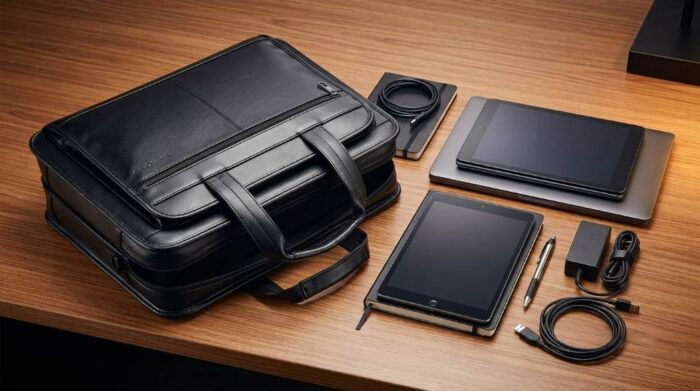
Pack your laptop, documents, chargers, and personal items by weight and access priority. Start with the protected laptop compartment, then organize documents and accessories before using the expansion zipper. A Samsonite expandable briefcase can hold several categories of work essentials without becoming disorganized.
Good packing protects equipment while keeping important items easy to reach. Most expandable briefcases also provide multiple pockets for separating cables, documents, and smaller accessories.
Understand The Briefcase Before Packing
Before adding anything, open every compartment and inspect the available space. Identify the laptop sleeve, document section, organizer pockets, main compartment, and exterior pockets.
Next, check the expansion zipper and understand how much additional depth it creates. Use that space only when your regular load needs extra room.
Because Samsonite produces several expandable briefcase designs, compartment layouts can differ between models. Therefore, pack according to your specific bag rather than following a fixed arrangement.
Know Your Available Space
Measure your laptop and compare it with the briefcase’s protected laptop compartment. Avoid forcing a device into a sleeve that feels tight around its corners.
Then inspect the main compartment for dividers or document holders. These sections help prevent papers from bending against heavier objects.
Check The Expansion Area
The expansion zipper creates additional depth, but more space does not mean unlimited capacity. Overfilling can make the briefcase bulky and harder to carry.
Keep the expansion section closed during normal commuting whenever possible. Open it when you genuinely need additional clothing, folders, equipment, or other thicker items.
Sort Everything Before It Enters The Bag
Start by placing everything you plan to carry on a desk or table. This simple step prevents duplicate chargers, unnecessary papers, and forgotten items from filling valuable space.
Now divide your belongings into four groups based on their function. Keep electronics, documents, personal items, and emergency essentials separate.
- Laptop and tablet
- Chargers and power accessories
- Documents, folders, and notebooks
- Mouse, headphones, and storage devices
- Wallet, keys, and identification
- Personal care and small travel essentials
Once sorted, remove anything you probably will not use during the day. A lighter briefcase usually feels better and remains easier to organize.
Pack The Laptop First
Your laptop should normally occupy the dedicated padded compartment. Place it inside gently and ensure the screen faces the padded interior.
Keep hard objects away from the laptop sleeve whenever possible. Pens, chargers, keys, and adapters can create pressure points when packed directly against the device.
After inserting the laptop, close the protective section before loading other compartments. This creates a stable foundation and reduces accidental contact with loose accessories.
Protect The Laptop From Pressure
Do not stuff documents or clothing tightly around the laptop compartment. Excess pressure can make removal difficult and may stress the zipper.
Instead, use soft items around the protected sleeve when your model allows surrounding storage. Keep heavier accessories toward the center of the bag.
Organize Documents Without Creating Bulk
Documents need structure because loose papers quickly create clutter. Place folders, notebooks, and meeting materials inside the document section whenever available.
Arrange papers according to when you will use them. Put today’s meeting materials near the front and reference documents behind them.
Use a slim folder for loose sheets rather than carrying individual pages. This approach also reduces folded corners and makes document retrieval faster.
Use A Simple Document Order
- Current meeting papers
- Daily notebook or planner
- Reference documents
- Extra forms or backup papers
Keep sensitive documents inside a zipped or enclosed section when your briefcase provides one. Avoid placing confidential papers inside an exterior pocket.
Pack Chargers And Cables As One System
Cables become one of the biggest sources of briefcase clutter. Keep your charger, charging cable, mouse, adapters, and power bank together.
A compact cable pouch works particularly well for this purpose. However, you can also use an internal organizer pocket when your Samsonite model provides enough separation.
Wrap each cable loosely instead of creating tight bends. Then secure longer cables with reusable cable ties to prevent tangling.
Keep Frequently Used Accessories Accessible
Place your phone charger and headphones somewhere you can reach without opening every compartment. Keep less frequently used adapters deeper inside the organizer.
Likewise, store your mouse near the laptop rather than inside a crowded exterior pocket. This keeps your workspace together and speeds up setup.
Use Small Pockets For Small Items
Small organizer pockets work best when each pocket has a clear purpose. Avoid placing random objects together simply because a pocket remains empty.
For example, keep pens in pen loops, keys in a key attachment area, and cards in their designated pocket. This arrangement makes every item easier to locate.
- Pen loop: pens and stylus
- Small zipper pocket: USB drives and memory cards
- Key attachment: keys
- Phone pocket: smartphone
- Card section: business and access cards
As a result, you spend less time searching through the briefcase. You also reduce the chance of small items becoming trapped beneath heavier belongings.
Pack The Main Compartment Strategically
The main compartment should hold flexible items that do not require rigid protection. Examples include a light sweater, compact umbrella, notebook, or travel accessories.
Place flatter items against the compartment walls first. Then position softer items around them without compressing the entire space.
Keep heavier objects low and close to the center. This placement helps maintain balance when you carry the briefcase by its handles.
Follow The Weight Order
Think of the bag as a small mobile workstation rather than an ordinary storage container. Heavy equipment belongs near the center, while light accessories can fill remaining gaps.
A practical order looks like this:
- Laptop in its protected sleeve
- Folders and notebooks against the document divider
- Chargers and electronics in organizer areas
- Soft personal items in remaining main space
- Small essentials in dedicated pockets
This structure prevents the contents from shifting excessively while you walk. It also keeps the briefcase easier to open without everything falling forward.
When To Use The Expansion Zipper
Use the expansion feature when your normal packing arrangement cannot comfortably accommodate everything. Do not open it simply because extra space exists.
For example, expansion can help when you add a sweater, extra documents, or equipment for an overnight work trip. It can also provide room for bulkier items that cannot fit neatly in the standard profile.
Before closing the expansion zipper, check whether the contents still move freely. If the bag looks strained, remove unnecessary items instead of forcing the zipper closed.
Keep Expansion Under Control
An expanded briefcase can become noticeably thicker and heavier. Therefore, treat expansion as a capacity reserve rather than your normal packing mode.
When commuting with only a laptop and documents, the slimmer configuration usually makes more sense. Save the expanded profile for days when the additional capacity serves a clear purpose.
Pack For Easy Airport And Office Access
If you travel frequently, place items you may need during screening near accessible compartments. Keep chargers, tablets, and documents organized so you can retrieve them without unpacking everything.
A Smart Sleeve can also help when your particular Samsonite model includes one. Place the briefcase securely over compatible luggage handles and keep the load balanced.
Before leaving home, test the bag while standing and walking. If the briefcase pulls heavily toward one side, redistribute the contents.
What Not To Pack Inside An Expandable Briefcase
Some items create unnecessary weight or increase the risk of damage. Remove them before your final packing check.
- Unnecessary duplicate chargers
- Old receipts and unused papers
- Large water bottles without secure seals
- Loose metal objects near electronics
- Excessive stationery
- Items you rarely use during workdays
Additionally, avoid placing liquids beside sensitive electronics. Keep any necessary liquid container sealed and separated from your laptop and documents.
A Five Minute Packing Routine
A repeatable routine makes daily packing much easier. Follow the same sequence each time so you do not rely on memory.
- Empty unnecessary items from the briefcase.
- Insert the laptop into its protected compartment.
- Add documents and notebooks by priority.
- Pack chargers and electronics into organizer sections.
- Fill small pockets with daily essentials.
- Add soft personal items to the main compartment.
- Open expansion only when necessary.
- Check balance, zippers, and weight before leaving.
After several days, this routine becomes automatic. Consequently, you can prepare the briefcase quickly without sacrificing organization.
How To Pack For Different Workdays
Your ideal setup depends on what the day requires. A meeting day needs different organization from a travel day or remote work session.
| Workday | Priority Items | Best Packing Approach |
|---|---|---|
| Office commute | Laptop, charger, documents | Keep the bag slim |
| Meeting day | Laptop, folders, notebook | Keep documents accessible |
| Business travel | Electronics, documents, clothing | Use expansion selectively |
| Presentation day | Laptop, adapters, notes | Keep accessories organized |
| Remote work | Laptop, charger, headphones | Prioritize quick access |
This flexible approach prevents you from carrying a full travel load during an ordinary office commute. Instead, you adapt the briefcase to the actual demands of each day.
Common Packing Mistakes To Avoid
The biggest mistake involves filling every available pocket. More contents can quickly turn an organized briefcase into a heavy and difficult work bag.
Another common mistake involves placing heavy accessories against fragile devices. Always use the briefcase’s protective sections as intended.
Finally, avoid expanding the bag without checking its balance. A larger profile can encourage overpacking, which reduces carrying comfort.
Final Packing Check Before You Leave
Before closing the briefcase, perform one quick inspection. Confirm that your laptop, documents, charger, keys, wallet, and other daily essentials are present.
Then check every zipper and make sure no compartment contains an item that could damage another object. Finally, lift the bag and assess whether the weight feels reasonable.
If anything feels unnecessary, remove it immediately. A well packed briefcase should give you access, protection, and balance without carrying your entire workspace.
Frequently Asked Questions
Should I expand my Samsonite briefcase every day?
No, keep it unexpanded for normal loads and use the extra capacity only when necessary.
Where should I put my laptop?
Place your laptop inside the dedicated padded compartment designed for your device size.
How should I organize laptop chargers?
Keep chargers and cables together inside an organizer pocket or compact cable pouch.
Can I pack clothes inside an expandable briefcase?
Yes, lightweight clothing can fit inside the expanded main compartment when your model provides enough space.
How can I prevent my briefcase from becoming too heavy?
Remove duplicate accessories and unnecessary papers while keeping heavier items close to the center.
Conclusion
Packing a Samsonite expandable briefcase works best when you organize by protection, frequency, and weight. Start with the laptop, arrange documents next, group electronics together, and use expansion only when necessary.
Before your next commute or business trip, empty the bag and rebuild your setup using this method. You will create a cleaner workspace, find essentials faster, and carry only what you genuinely need.
For the best results, make this five minute routine part of your regular preparation. A well packed briefcase should support your workday rather than make it harder.